Case Study — Merkle
Redesigning a legacy enterprise marketing platform into a modern campaign operating system that reduced workflow complexity, improved usability, and enabled teams to launch campaigns significantly faster.

Role
Product Designer
Company
Merkle
Duration
Jul 2024 – Aug 2025
Industry
Enterprise SaaS · MarTech
22%
Increase in engagement
150+
Enterprise users researched
3
Agile squads
AA
WCAG 2.1 compliance
Executive Summary
One platform, fourteen disconnected screens
A campaign manager at a global retailer needs to reach lapsed customers across email, SMS and push, in four markets, with consent honoured and a budget signed off. ECO is where that happens end to end.
Inconsistent UI patterns, poor information architecture, and cognitive overload slowed every team down, from campaign managers to legal reviewers.
Design Vision
Transform disconnected marketing tools into one intelligent operating system.
Executive Summary
What the platform actually does
Fortune 500 marketing teams relied on fragmented legacy systems to manage complex omnichannel campaigns. Launching a single campaign meant navigating fourteen disconnected screens.
Inconsistent UI patterns, poor information architecture, and cognitive overload slowed every team down, from campaign managers to legal reviewers.

Understanding the Business
Six roles, one campaign workspace
Strategy
Marketing Manager
Goal: Align channels, timing, and business outcomes.
Pain point: Low visibility and slow approvals.
Execution
Campaign Manager
Goal: Build and launch campaigns accurately.
Pain point: Duplicate work and fragile handoffs.
Data
CRM Specialist
Goal: Create accurate segments and rules.
Pain point: Advanced filters are hard to trust.
Insights
Marketing Analyst
Goal: Explain performance and business impact.
Pain point: Delayed, contextless analytics.
Governance
Director of Marketing
Goal: Oversee portfolio risk and adoption.
Pain point: No unified operational view.
Compliance
Legal Reviewer
Goal: Review content and approvals.
Pain point: Unclear audit history.
The Problem
Fourteen steps to launch one campaign
01
Strategy intake
02
Campaign brief
03
Channel selection
04
Audience rules
05
Suppression lists
06
Journey setup
07
Content creation
08
Personalization
09
QA
10
Legal review
11
Business approval
12
Launch scheduling
13
Monitoring
14
Analytics
60%
Lost inside advanced filtering
High
Support ticket volume
Slow
Campaign launch speed
Steep
Learning curve for new users


Research
Grounded in 150+ enterprise conversations
Visualizing the end-to-end orchestration lifecycle for the ECO enterprise platform by mapping out every type of user's journey. Based on the conversations, I mapped it out categorizing by empathy and what the user felt about using an enterprise campaign orchestrator.

Interviews
Usability Testing
Heatmaps
Analytics
Journey Mapping
Competitive Analysis
Affinity Mapping
01
Marketing managers think in workflows, not features.
02
Users constantly switch between dashboards.
03
Users need progressive guidance.
04
Campaign approvals create unnecessary bottlenecks.
How Might We
How might we reduce campaign creation time?
How might we simplify audience segmentation?
How might we improve collaboration?
How might we surface insights earlier?
How might we reduce navigation complexity?
Design Principles
Five rules that filtered every decision
01
Progressive Disclosure
One decision at a time.
02
Task-first Navigation
Users think in outcomes, not modules.
03
Single Source of Truth
Every campaign lives in one workspace.
04
Design for Scale
Enterprise complexity without overwhelm.
05
Data with Context
Every metric answers a business question.
Information Architecture
From feature list to campaign lifecycle

Before — Feature-based
— Dashboards
— Audiences
— Journeys
— Messages
— Approvals
— Analytics
— Assets
— Settings
After — Task-based
— Plan
— Build
— Review
— Launch
— Monitor
— Optimize
— Report

Sarah’s journey — Marketing Manager
01
Morning dashboard
Reviews campaign health and risks.
02
Campaign creation
Captures goal, channel, and timing.
03
Audience & journey
Builds segments and cross-channel flow.
04
Content & review
Previews content, resolves comments.
05
Launch & monitor
Approves, launches, watches delivery.
06
Optimize & report
Tests variants, prepares readouts.
Final Product
What Shipped


Dashboard
KPIs appear first so teams have operational awareness before task execution.
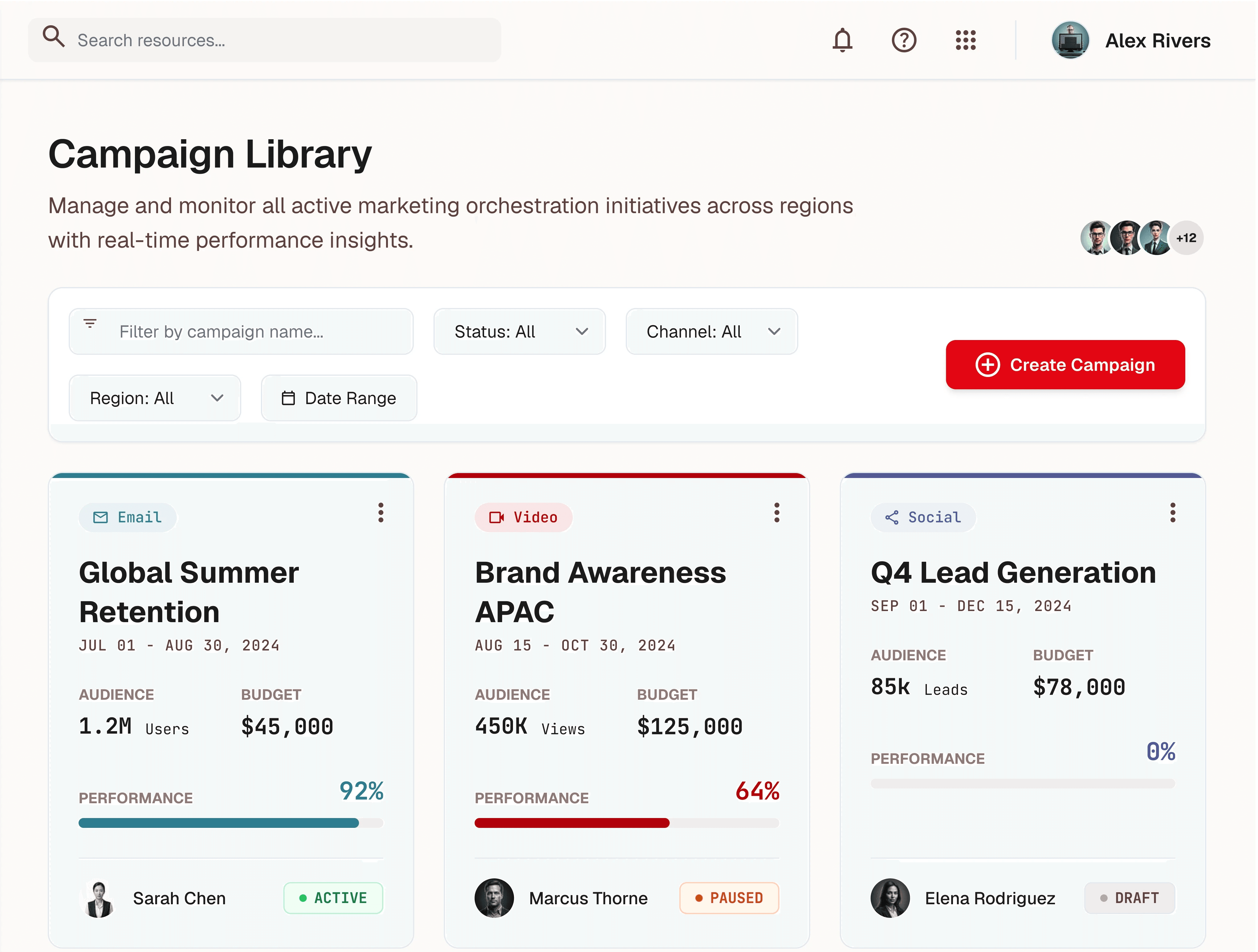
Campaign Library
Optimized for scanning: status, owner, channel mix, and pending actions.

Campaign Wizard
Progressive disclosure guides setup one decision at a time.
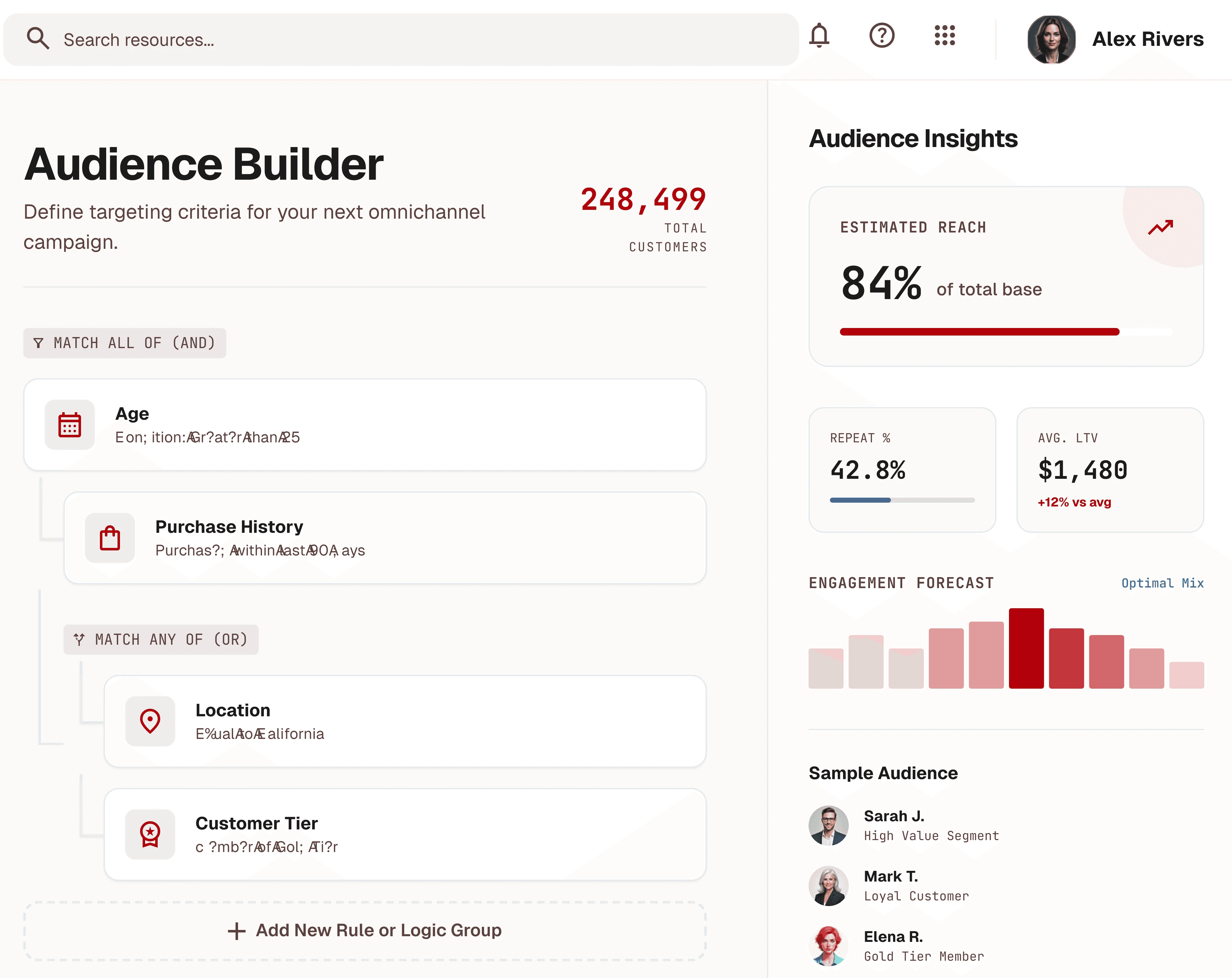
Audience Builder
Visual filtering makes segmentation logic readable and testable.

Journey Builder
Drag-and-drop orchestration across Email, SMS, Push, and In-App.

Review Screen
Consolidates content, audience, and approvals for launch confidence.

Live Monitoring
Delivery health and anomalies surfaced for operational awareness.

Analytics
Turns performance data into a story that supports optimization.

Experiments
Variant comparison and learnings support continuous optimization.

Approvals
Owners, deadlines, and audit trail improve governance.

Comments
Contextual collaboration keeps feedback inside the campaign.

Asset Library
Centralizes reusable marketing assets across teams.
Design System
Tokens that kept 12 releases consistent
Typography
— Geist Display
— Inter Body
— JetBrains Mono Data
Spacing
— 8px Base Unit
— 16px Card Radius
— 96px Section
Color
— Navy
— Red
— Teal
— Orange
— Purple
Accessibility
— WCAG 2.1 AA
— Focus States
— Keyboard Nav
Impact
Measurable results across the platform
22%
Increase in engagement
Faster
Campaign setup
Fewer
Support tickets
Higher
Platform adoption
The new workspace is calmer, more predictable, and finally matches how we actually plan campaigns.
Director of Marketing, Enterprise Client
Reflection
This project reinforced that enterprise UX is not about making complexity disappear, it is about making complexity understandable and trustworthy.
Progressive disclosure became the core strategy because it respected both marketers who needed speed and enterprises who needed governance.
Future opportunities include AI-assisted campaign recommendations, predictive audience insights, and intelligent automation for journey optimization.

Latest Project